Where It All Started#
Honestly, I’m not even sure how I ended up here.
It started with process injection on Linux something I was poking at in my spare time between work. One thing led to another, and at some point I searched online and stumbled across something called Linux fileless malware. I’d heard of fileless attacks on Windows, but Linux? That caught my attention. I thought I knew what it meant. Run something without dropping a file. Simple.
Except it wasn’t.
The more I read, the more questions I had. Where do the bytes actually live if there’s no file? What does the kernel think is happening? Which syscall actually triggers execution and why does it matter which one? I’d answer one question and three more would show up. That’s usually the sign that something is worth digging into properly.
The articles I found were good but incomplete most covered one angle, one technique, one tool. Nobody had written the thing I actually wanted to read: a complete walkthrough of how this works at the kernel level, from the first syscall to a fully running in-memory process, with explanations for what’s happening at each step and why.
So I wrote it myself.
This series is the result of a few months of going through kernel source code, running experiments, and building a mental model that finally felt solid. It’s not a malware analysis and it’s not a threat intel report. It’s just me trying to understand something properly and documenting what I found the mechanics, the internals, and why this technique is considerably more interesting than the one-line definition suggests.
Wait, What Is “Fileless” Actually?#
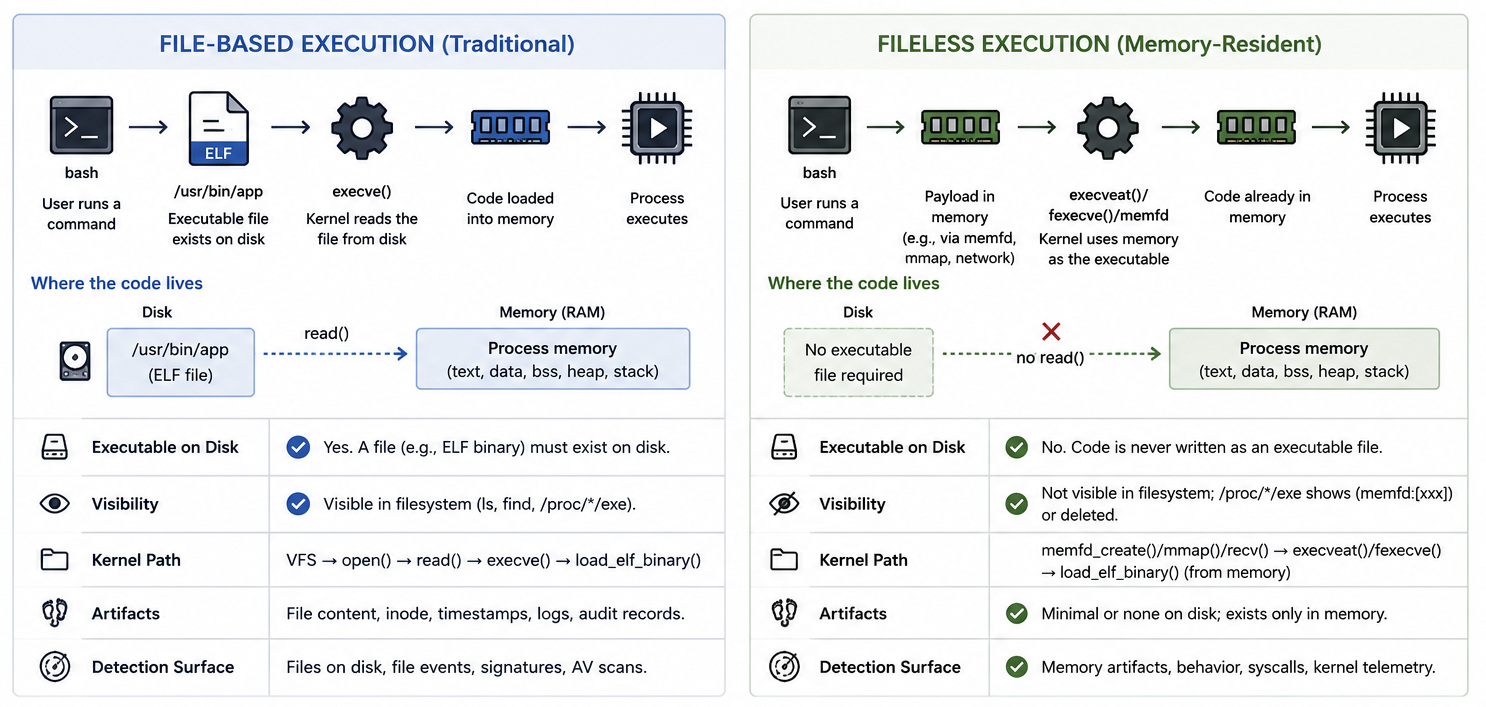
The term fileless is a little misleading. It doesn’t mean there’s no file involved at all it means no persistent ELF binary is ever written to a block-device-backed filesystem before it runs.
To understand why that matters, think about how a normal binary executes: you compile it, it sits on disk as a file, the kernel opens that file, reads the ELF headers, maps the segments into memory, and runs it. The file on disk is the starting point for everything.
Fileless execution cuts that starting point out entirely. The payload never touches the HDD or SSD instead it lives in RAM from the moment it exists. The kernel is handed a reference to that chunk of memory as if it were a regular file, and it launches the process straight from there.
From the kernel’s perspective the execution looks completely normal it’s reading an ELF, setting up memory regions, mapping segments. The only difference is that the “file” it’s reading from is backed by RAM, not a block device. And that one difference is exactly why legacy disk-scanning tools never see it there’s nothing on disk to scan.
The Three System Calls Behind Fileless Execution#
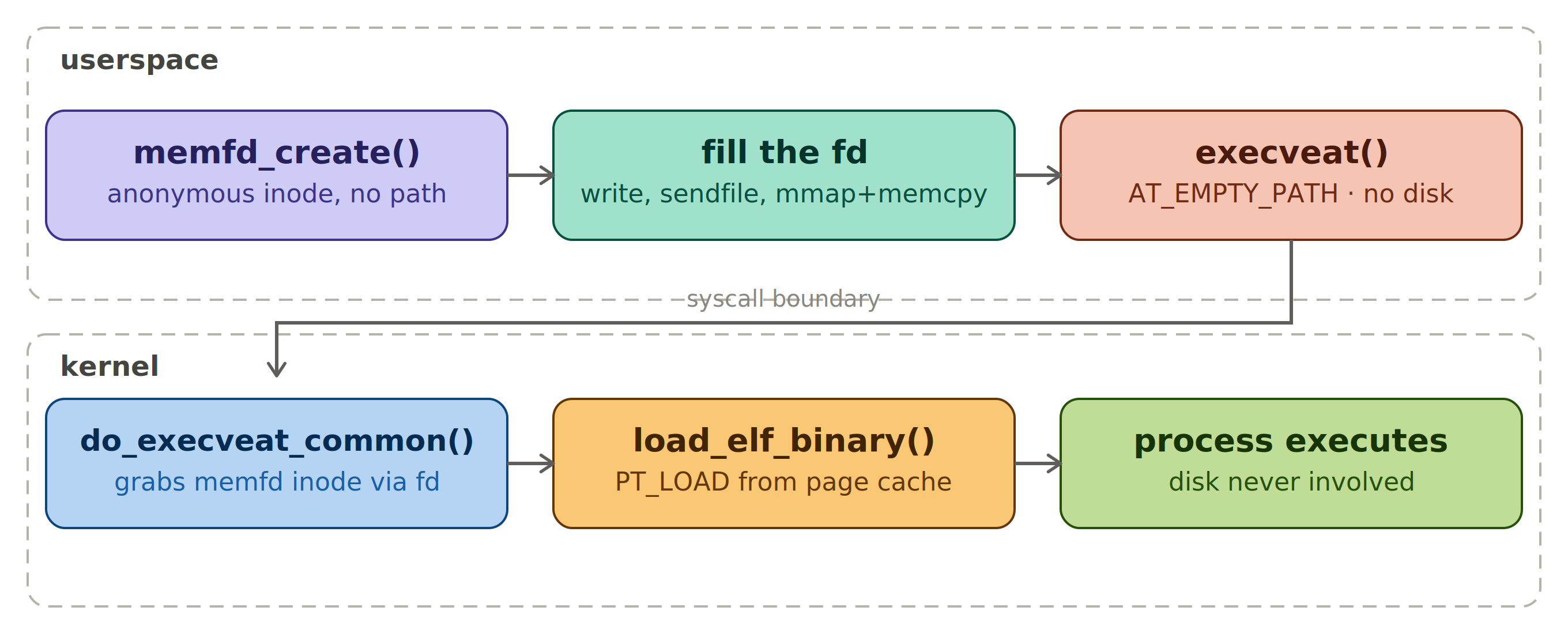
The whole trick comes down to three syscalls. First, memfd_create() creates an anonymous file that lives purely in RAM no path, no disk backing, just a file descriptor pointing at a chunk of memory.
The MFD_CLOEXEC flag is worth understanding here: it closes the file descriptor the moment execveat() fires, but that doesn’t kill the payload. The fd and the inode are two completely different things when execveat() fires, load_elf_binary() maps the PT_LOAD segments from that inode into the new process’s virtual address space, and those VM mappings hold their own reference to the inode. So the process keeps running fine with the fd gone. The inode only gets freed once the process exits and those mappings get torn down no disk trace ever, no memory trace after exit.
Second, you fill the fd write() if the payload is already in a buffer, sendfile() if it’s coming over a socket, or mmap()+memcpy() if it’s already mapped somewhere in memory. Doesn’t matter which one you pick, the bytes land in RAM-backed page cache either way block device never comes into the picture.
Third, execveat(fd, "", ..., AT_EMPTY_PATH) fires it the empty pathname combined with AT_EMPTY_PATH tells the kernel to skip pathname resolution entirely and just operate on the fd directly. Three syscalls, three jobs: create the container, fill it, run it disk never enters the picture at any step.
 // fileless execution  three syscalls, zero disk

// ── 1. memfd_create() ─────────────────────────────────────────────────
fd = memfd_create("payload", MFD_CLOEXEC)

// ── 2. fill the fd with the ELF payload ──────────────────────────────
write(fd, elf_buf, size)            → payload already in a buffer
sendfile(fd, socket_fd, size)       → payload arriving on a socket
mmap(fd) + memcpy(elf_buf) + munmap → payload already mapped

// ── 3. execveat() ─────────────────────────────────────────────────────
execveat(fd, "", argv, envp, AT_EMPTY_PATH)
From Userspace to Kernel: Breaking Down Each System Call#
memfd_create(name, flags) :: creating the anonymous container#
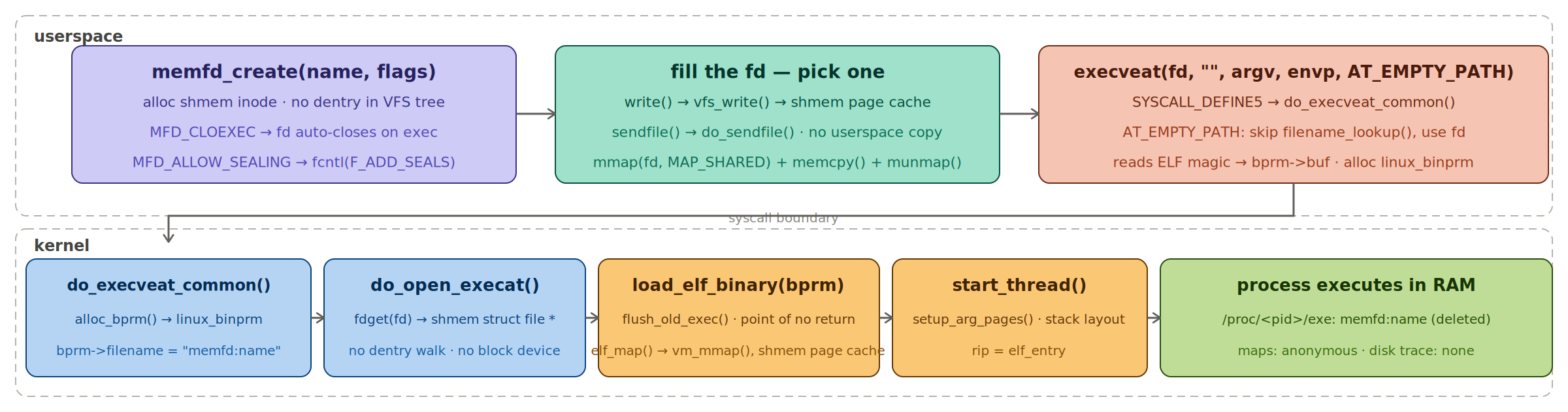
memfd_create()is the foundation of the whole technique. When you call it, the kernel allocates an anonymous inode on an internal tmpfs/shmem filesystem. It’s a real file from the kernel’s perspective — it has an inode, it has page cache pages, it participates in the VFS but it has no path. There’s no directory entry pointing at it anywhere in the filesystem tree. The only handle to it is the file descriptor the syscall hands back.The
nameargument is purely cosmetic. It shows up asmemfd:<name>under/proc/<pid>/fd/and in/proc/<pid>/mapswhich is actually worth knowing from a detection standpoint but it has no effect on how the file behaves and it doesn’t create any filesystem presence. You can pass an empty string and nothing breaks.The
flagsargument is where the meaningful decisions are.MFD_CLOEXECis the one you almost always want it marks the fd close-on-exec, so it gets automatically closed whenexecveat()fires and the new process image takes over, meaning the raw memfd handle never leaks into the child.
MFD_ALLOW_SEALINGenables the file sealing API, which lets you lock down the file’s properties for example callingfcntl(fd, F_ADD_SEALS, F_SEAL_WRITE)after writing the payload prevents any further modifications to the file contents. From a tradecraft perspective that’s interesting because a sealed, read-only memfd is harder to tamper with mid-execution and it can also make the payload look more “legitimate” since sealed memfds share characteristics with files loaded by the dynamic linker.The resulting fd behaves exactly like a regular file descriptor in every way that matters you can
fstat()it,ftruncate()it,read()/write()it, and most importantlymmap()it and pass it toexecveat(). The only thing you can’t do is find it by walking the filesystem.
write() / sendfile() / mmap()+memcpy() :: filling the container#
Once you’ve got the memfd fd, you need to get the ELF payload bytes into it. There are three realistic ways to do this and the right choice depends on where the payload is coming from.
write(fd, buf, size)is the straightforward option. If you’ve already got the ELF bytes in a userspace buffer decoded from a base64 blob, decrypted from an XOR’d array embedded in the binary, downloaded and sitting in a heap allocation you just write them in. Internally the kernel copies the bytes from your userspace buffer into the page cache pages backing the memfd inode. Simple, and there’s nothing wrong with it for most use cases.
sendfile(memfd, src_fd, offset, size)is the cleaner option when the payload is arriving over a network socket or being read from another file descriptor.sendfile()is a kernel-to-kernel copy it moves data directly between two file descriptors without pulling the bytes through userspace at all. No intermediate buffer, no extra copy. If you’re writing a dropper that downloads the payload over a TCP connection and drops it straight into a memfd,sendfile()is the right call because it keeps the entire data path in the kernel.
mmap()+memcpy()is the option when the payload is already mapped somewhere in memory say you’ve received it as a shared memory segment or you’re reflectively loading it from inside a running process. Yoummap()the memfd withPROT_READ|PROT_WRITEandMAP_SHARED,memcpy()the payload into the mapped region, thenmunmap()the mapping. The bytes end up in the same page cache pages either way.Regardless of which method you pick, the result is identical from the kernel’s perspective: the memfd’s inode now has page cache pages populated with a valid ELF image, those pages are backed by tmpfs/shmem, and there’s no block device involved anywhere in the chain. The page cache pages will never get written back to disk because there’s no backing store to write them back to they’re anonymous, they live and die in RAM.
execveat(fd, “”, argv, envp, AT_EMPTY_PATH) :: firing it#
execveat()is the syscall that actually runs the in-RAM ELF. To understand it properly you need to understand the two arguments that make this whole technique work: the empty string pathname and theAT_EMPTY_PATHflag.Normally
execveat(dirfd, pathname, ...)resolvespathnamerelative todirfdit’s essentially a directory-relativeexecve(). But when you pass an empty string""as the pathname and setAT_EMPTY_PATHin the flags, the semantics change entirely: the kernel operates directly onfditself rather than resolving any path. That’s the crucial detail. No pathname lookup, no dentry walk, no VFS traversal to a block device the kernel just takes the file descriptor and runs it.Internally
execveat()hitsSYSCALL_DEFINE5(execveat, ...)infs/exec.cand immediately callsdo_execveat_common(), which is the shared core behind the entireexecve()/execveat()family. The first thingdo_execveat_common()does is calldo_open_execat()to get astruct file *for the target. With a normalexecve()this is where the pathname gets resolved down to an inode but becauseAT_EMPTY_PATHis set andfdis a valid file descriptor,do_open_execat()short-circuits the pathname resolution entirely and just returns the file object already backingfd, which is your memfd’s anonymous tmpfs inode. No block device anywhere in that path.
do_execveat_common()then allocates and fills astruct linux_binprmthis is the bookkeeping struct that carries everything the exec machinery needs: the file pointer, the new credentials, the argument and environment strings copied from userspace, and flags. It reads the first few bytes of the file (the magic bytes) into the binprm’s buffer so binary format handlers can identify the file type.From there it calls
search_binary_handler(), which walks the registered binfmt handlers asking each one “can you handle this?” For a standard ELF payload,binfmt_elf’sload_elf_binary()claims it.That’s where the real execution setup happens:
load_elf_binary()parses the ELF header and program headers, callsflush_old_exec()to tear down the calling process’s old address space (the point of no return), sets up the newmm_struct, maps each PT_LOAD segment from the memfd into the new address space, handles the dynamic linker (ld.so) if the binary is dynamically linked, sets up the stack with argv/envp, and finally callsstart_thread()to set the instruction pointer to the ELF entry point and hand control to the new process image.The entire path from
execveat()down to the entry point never touches a block device. The PT_LOAD segments are mapped directly from the memfd’s page cache pages into the process address space same mechanism as mapping any file, just without the block-device-backed inode at the other end. From this point on the process runs normally. The only forensic tell is in/proc/<pid>/exe, which resolves tomemfd:<name> (deleted)rather than a real filesystem path and that’s exactly what detection tooling keys on.
Observing Fileless Execution With POC#
1. The Baseline :: What a Normal Process Looks Like#
Before you can spot something suspicious you need to know what normal looks like. So let’s start there.
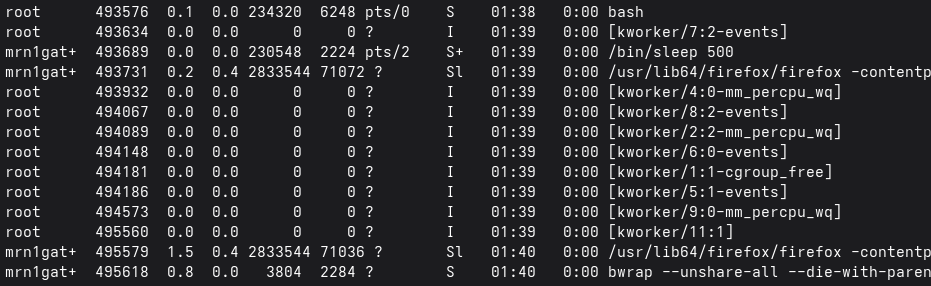
Run /bin/sleep 500 in one terminal and look at it from another. In ps aux you see the full path /bin/sleep 500. The command, the binary, the arguments all visible. That’s what a normal process looks like from the outside. The kernel knows exactly where on disk this binary lives and it’s not hiding anything.
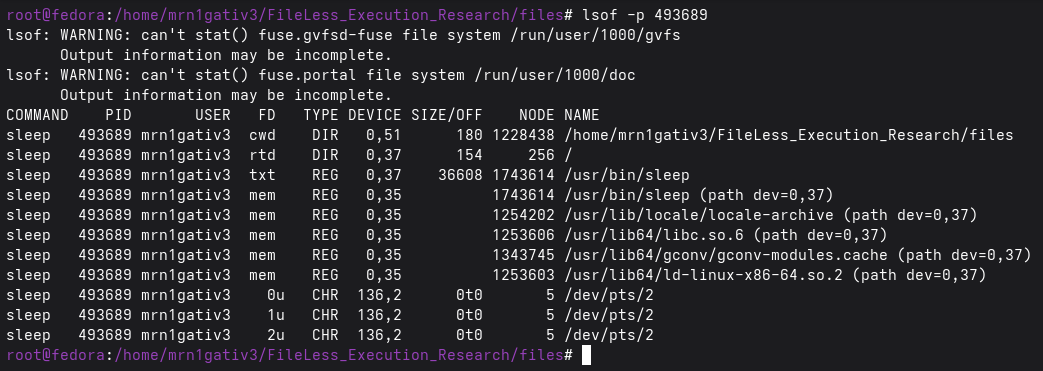
Now open lsof -p <pid>. The txt entry that’s the executable mapped as text points straight to /usr/bin/sleep on a real block device. Below it you’ll see the shared libraries it pulled in: libc.so.6, ld-linux-x86-64.so.2. Every file this process depends on has a real path, a real inode, a real device number.
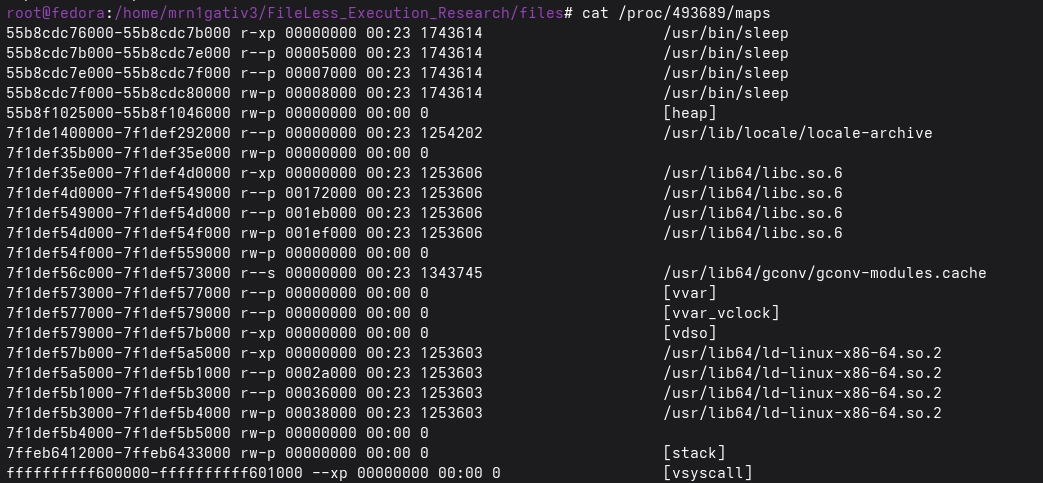
Open /proc/<pid>/maps and you see the same story. Every memory region is backed by a real file on the filesystem. The kernel mapped those segments directly from disk into memory and there’s a clear trail showing exactly which file backed each region.
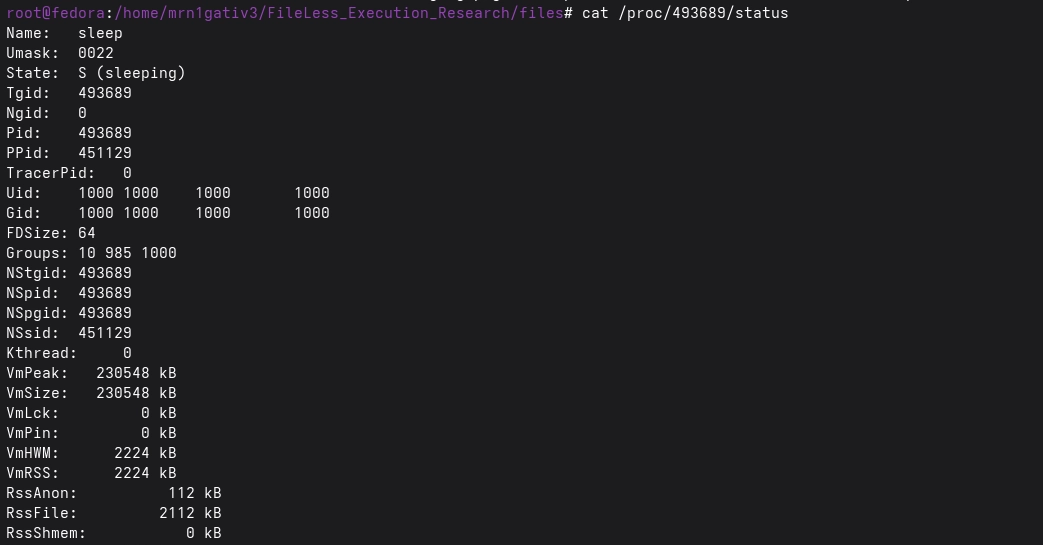
Finally /proc/<pid>/status two fields matter here. RssFile is high because most of the process’s resident memory is file-backed. RssShmem is zero because nothing came from shared memory. This is what a healthy, traceable process looks like.
Keep these numbers in your head. Everything about to follow is the exact opposite.
2. Demo 1 :: Direct Execution#
This is the basic case. The loader runs, creates an anonymous file in RAM, writes the payload into it, and calls execveat(). The calling process transforms into the payload same PID, completely new image. The loader is gone. The payload is running.
What you see in ps#
In ps aux the process shows up as just payload with no path. That’s already wrong every legitimate binary on your system has a path. The absence of a path is the first thing that should catch your eye. If you’re scanning ps output and something shows up without a full path it’s worth stopping and looking harder.

What lsof tells you#
Run lsof -p <pid> against the payload process and the txt entry the executable reads /memfd:payload (deleted). Two things stand out immediately. The (deleted) suffix means no directory entry ever existed for this file. It was never on the filesystem. And the device is 0,1 that’s the kernel’s anonymous tmpfs, not any real storage device. Compare this directly against the sleep process where the same field shows /usr/bin/sleep on a real block device.
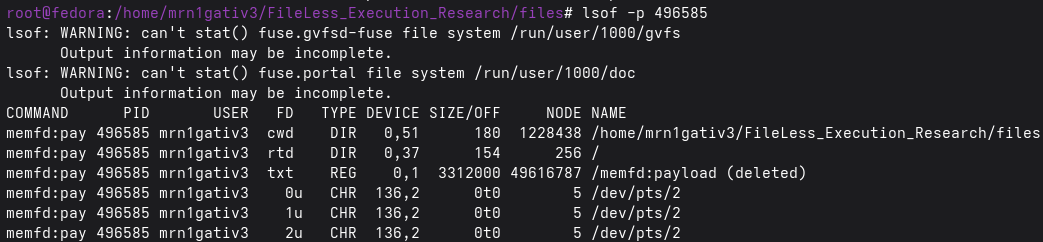
Notice also what’s completely missing from the lsof output: no libc.so.6, no ld-linux-x86-64.so.2, none of the shared libraries that show up for every normal process. That’s because our payload is compiled with no libc at all nothing was ever loaded from disk. The dynamic linker never ran. Not a single library was read from storage.
What maps tells you#
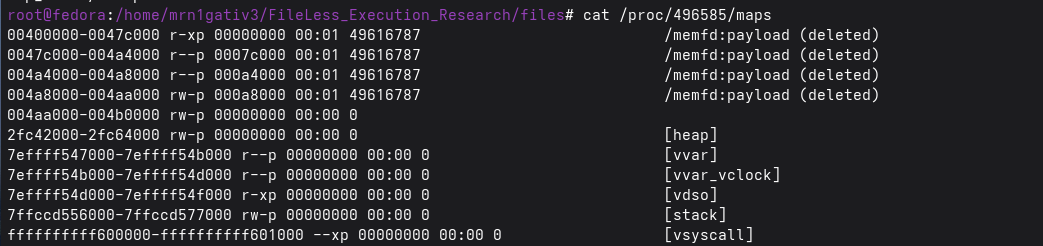
/proc/<pid>/maps is the most definitive view. For a normal process every segment has a real filesystem path. For the fileless payload every single segment the text segment, the read-only data, the read-write data, all of it reads memfd:payload (deleted) backed by device 00:01. There is no real path anywhere in that file. The entire process exists only in RAM. No disk scanner will ever find this binary because there is nothing on disk to find.
What status tells you#
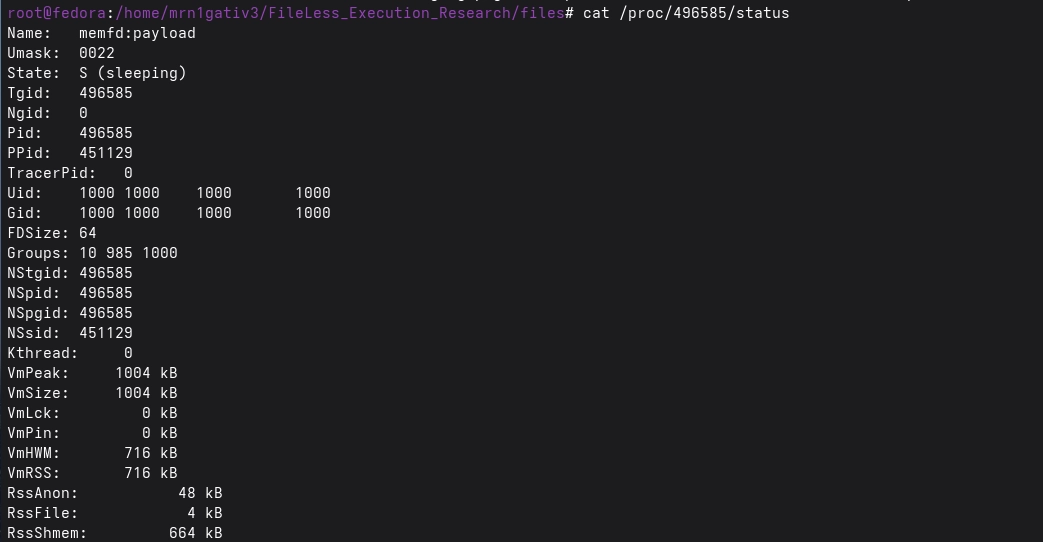
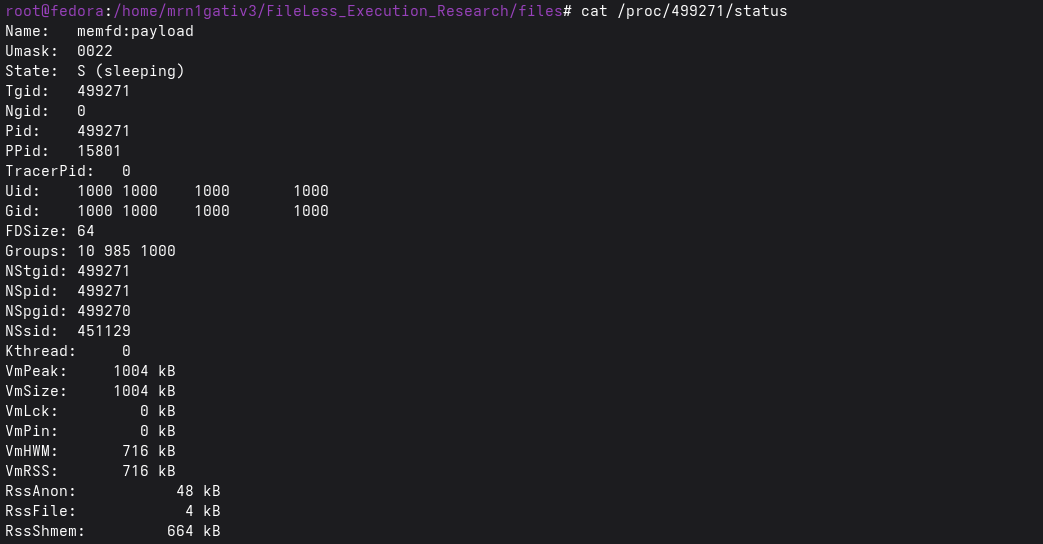
Two numbers in /proc/<pid>/status flip completely compared to a normal process. RssFile is near zero almost none of the process’s resident memory is file-backed. RssShmem is high the bulk of the process lives in shared memory backed by the anonymous shmem filesystem. The Name field reads memfd:payload instead of a binary name. These three together high RssShmem, near-zero RssFile, memfd: prefix in Name are the programmatic signature you can hunt for across a live system.
3. Demo 2 :: The Orphan (The Harder Case)#
Demo1 is the straightforward case. The loader runs, transforms into the payload, and you can find it. In the Demo2 scenario what happens. The loader creates the memfd, writes the payload, forks a child, then exits immediately. The child calls execveat() and becomes the payload. By the time you start investigating, the loader is already gone from the process table. You’re looking at a process that appears to have come from nowhere. This breaks the most common first step in incident response tracing the process tree backwards. With demo1 you can still see the loader before it transforms. With demo2 the trail is cold before you even started looking.
What ps shows you and what it doesn’t#
In ps aux the orphaned payload looks exactly like demo1. No path, just payload, same memory size, same user. There is nothing in this output that tells you the loader is already gone. This is the point. From ps alone you cannot tell the difference between a fileless process whose loader is still running and one whose loader has already exited. You need to look deeper.

The lsof and maps have identical signature#
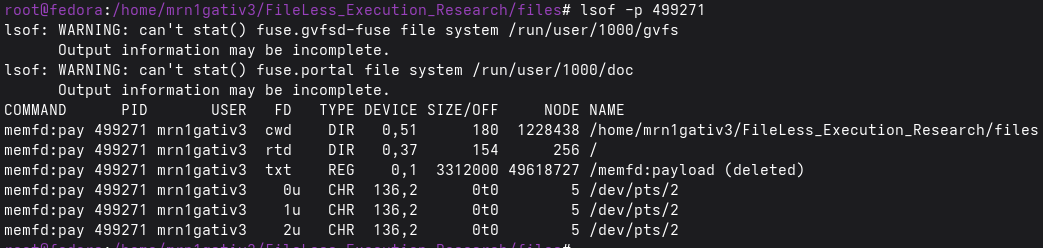
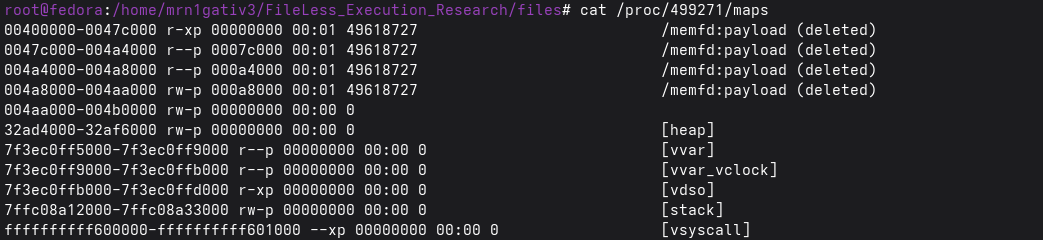
Run lsof -p <pid> and you get the same output as demo1. The txt entry reads /memfd:payload (deleted) on device 0,1. No shared libraries. No real paths. Run cat /proc/<pid>/maps and every segment shows memfd:payload (deleted) on 00:01. There is no way to tell from lsof or maps that the loader behind this process has already exited.
This is an important point for your detection logic. The memory signature of a fileless process is identical regardless of whether it was launched via demo1 or demo2. The technique used to get it running doesn’t change what the running process looks like. You don’t need to know which demo created it you just need to look at what’s in front of you and recognise the memfd pattern.
lsof -p 499271
/proc/499271/maps
Status where the Orphan story starts#
Open /proc/<pid>/status and the familiar fields are all there. Name: memfd:payload, RssFile: 4 kB, RssShmem: 664 kB. Same as demo1. But look at PPid: 15801. In demo1 the parent was your shell /usr/bin/zsh. That makes sense, the loader ran from your terminal and the shell is still sitting there as the parent. The connection is visible.
Demo2 is different. The loader forked a child, handed it the memfd, and exited before the child finished. The child was left without a parent and the kernel handed it to the nearest subreaper which on modern Fedora is systemd --user. Run ps 15801 and you’ll see exactly that. Your session manager quietly adopted the orphan. The loader is completely gone.
PPID: 15801

Why it is more sophisticated than Demo1#
In demo1 the trail still exists. You can see the loader, trace the parent, ask “what process started this?” and get a meaningful answer. The fileless binary is running but the context around it is intact.
Demo2 goes one step further. The loader deliberately destroys its own evidence before you even start looking. It forks the child, hands off the memfd, and exits all in a fraction of a second. By the time the payload is running there is no loader in the process table, no parent that tells you anything meaningful, no history of how this payload arrived. The origin is gone before the investigation begins.
This is what makes the orphan pattern more sophisticated it separates the act of launching the payload from the evidence of launching it. In demo1 both exist at the same time. In demo2 one is already erased by the time the other is visible. The payload runs just the same either way, but the story of how it got there only exists in demo2 for a few milliseconds before the loader exits and takes it with it.
What This Research Changed For Me#
Honestly, I started this thinking it’d be a weekend thing read a few man pages, write some code, ship a post. Months later I’m knee-deep in kernel source trying to understand why a process with no path on disk can just… run.
The answer turned out to be simpler than I expected: the kernel doesn’t care about files, it cares about inodes. memfd_create gives you one with no dentry attached, execveat runs it by fd, and nothing ever touches the filesystem. Two syscalls. That’s the whole trick.
What actually surprised me was how visible it is once you know where to look. The /proc entries don’t lie RssShmem through the roof, RssFile near zero, memfd: sitting right there in Name. It’s not stealthy in the forensics sense, it just sidesteps every tool that’s looking at the wrong layer.
Part 2 will cover catching this live eBPF at the execveat boundary, before the inode’s gone. No ETA but the research is already done, just needs writing up. Code’s on GitHub if you want to run it yourself
References#
https://man7.org/linux/man-pages/man2/memfd_create.2.html
https://man7.org/linux/man-pages/man2/execveat.2.html
https://magisterquis.github.io/2018/03/31/in-memory-only-elf-execution.html